


We’ve all been there. You craft the perfect hook for your Instagram Reel, add catchy subtitles, hit post… and your text gets sliced right off the screen. All that effort, wasted in the crop. If you’re a social media manager or video creator, you know how frustrating it is when your captions, hooks, or callouts vanish the moment your video jumps from one platform to another.
But what if you could keep every word in its place — no matter the platform? This is where a smart video resizer can become your content’s new best friend. And with tools like Pippit, it’s not just about resizing — it’s about resizing strategically, so every word you write stays visible and scroll-stopping.
Why captions matter more than ever
Let’s face it: we live in the age of silent scrolling. Most viewers watch Reels, TikTok, or Shorts on mute. If your message lives only in your voiceover, you’re missing out. Those tiny lines of text do the heavy lifting:
-
Hooking attention in seconds: Your opener line often decides if they’ll stick around.
-
Making it accessible: Captions make your content inclusive for viewers who are deaf or hard of hearing.
-
Boosting retention: A well-timed subtitle can keep a viewer engaged from start to finish.
So when your captions are chopped off or hidden behind icons, your content’s power takes a hit.
From desktop to mobile: where things go wrong
The #1 culprit? Wrong sizing. Your beautifully framed desktop video rarely matches the vertical playground of TikTok or Reels. What’s worse is that your carefully placed text overlays end up sitting outside the new ‘safe zone.’
The solution? Mastering both resizing and cropping. And yes, learning how to crop video online is just as important as picking the right aspect ratio.
Meet your resizing sidekick: Pippit
Enter Pippit — the friendly, intuitive tool that helps you resize videos for every feed, keep captions readable, and crop strategically, so your words stay exactly where they should.
It acts as the personal bodyguard for your video, ensuring that nothing crucial is cut off. Without a design degree or hours of searching for ‘safe text zone,’ here’s how to utilise Pippit’s video resizer to protect your text and increase your reach.
Smart tricks to keep your text hooks front and center
Here are some expert tips to prevent your text from going missing before we go into how it operates:
-
Make use of live previews: Verify your video’s appearance in the native dimensions of the platform at all times.
-
Make sure that your captions are tight and high: Since subtitles are the first item to be cut, try to keep them away from the edge.
-
Incorporate safe margins: Your text is kept away from platform icons like comments, shares, and like buttons by providing a little padding.
-
Crop strategically: Choose carefully what remains in the frame when cropping a video for the internet.
No matter where it ends up, a video that has been carefully cropped and resized looks professional.
Pippit’s simple 3-step flow for text-safe resizing
Ready to save your captions from the chopping block? Here’s how you can do it with Pippit:
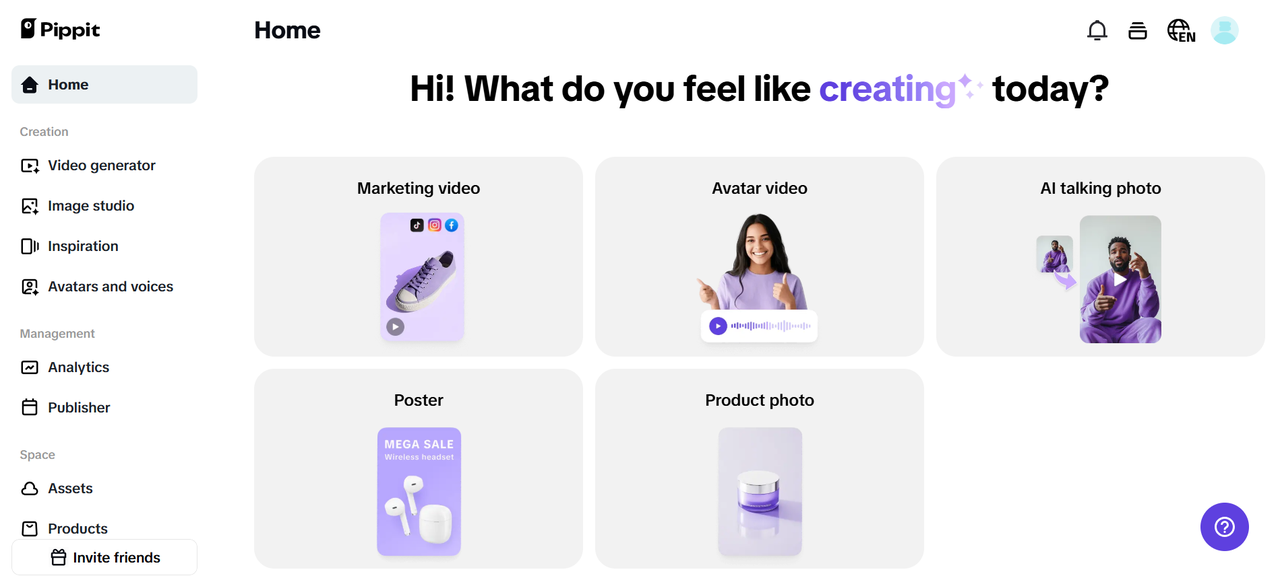
Step 1: Upload your video
Launch Pippit, then choose the ‘Smart crop‘ option. You may upload your video straight from your phone, desktop, or cloud. Resizing is effortless using Pippit’s user-friendly interface, regardless of whether you’re dealing with a Facebook square clip or a YouTube landscape video.
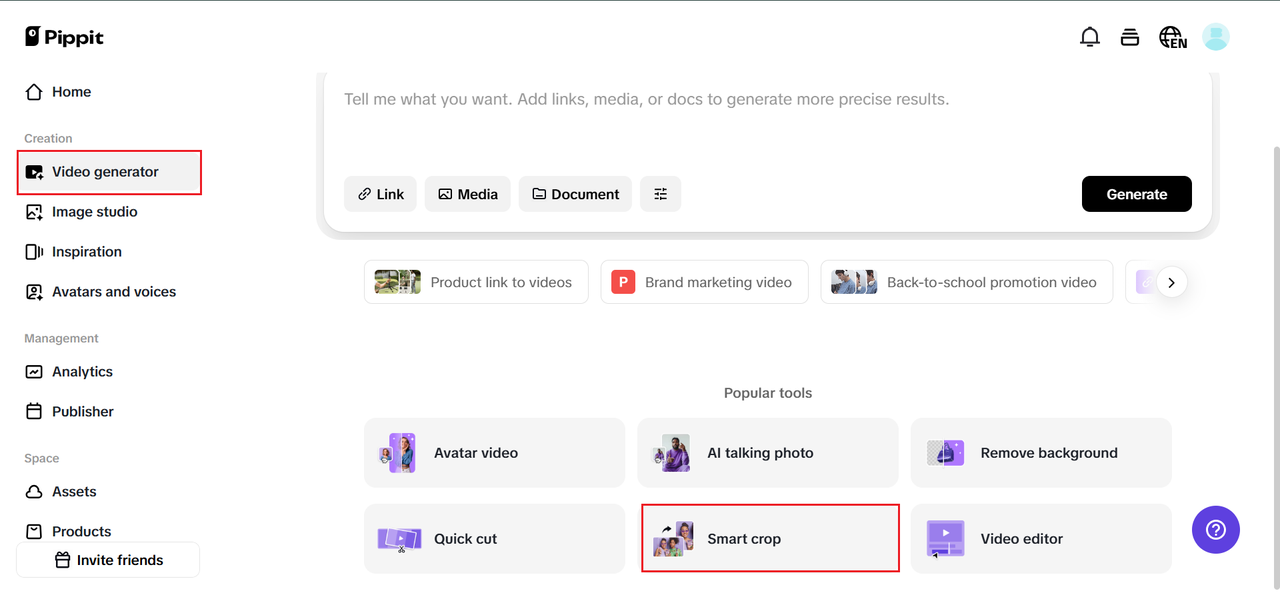
Step 2: Adjust the aspect ratio
This is where the magic happens. Pick the aspect ratio that matches your target platform:
-
9:16 for TikTok, Instagram Reels, or Shorts.
-
16:9 for YouTube or Facebook feeds.
-
1:1 for square promos.
Use Pippit’s real-time preview to check that your captions stay inside the safe zone. And remember: if you need to reposition your footage, now’s the time to crop video online to keep the text clear, hooks visible, and faces centered.
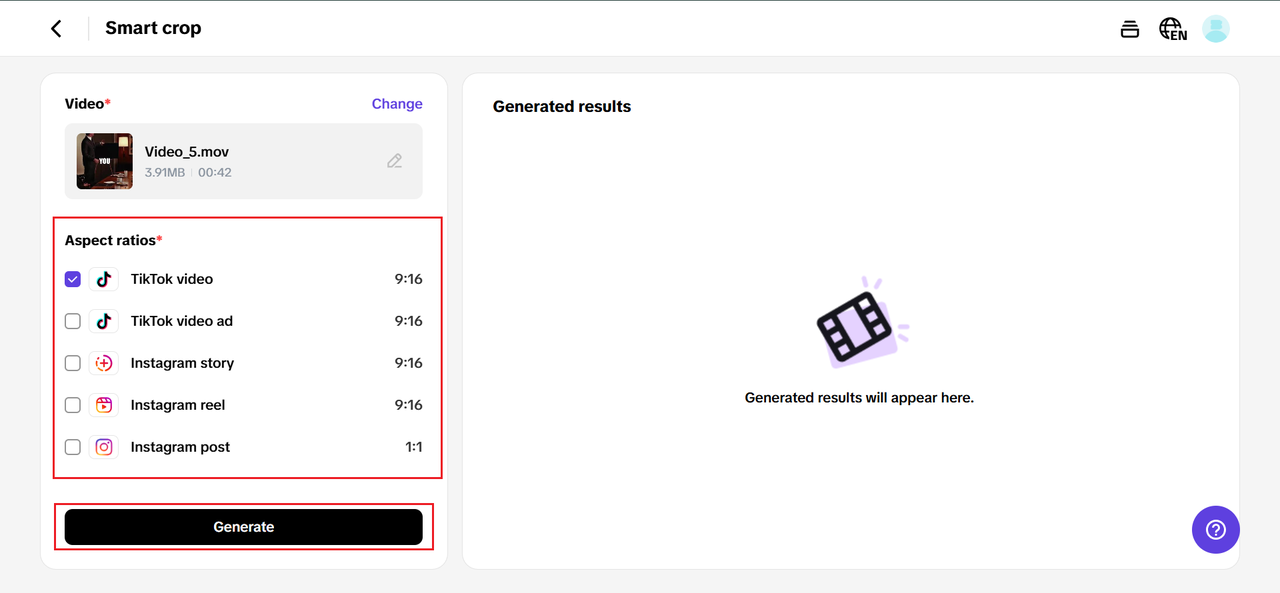
Step 3: Download & share the video
Happy with how it looks? Click preview to double-check your captions, then hit ‘Export’ to save your resized masterpiece. With Pippit, you can resize and crop videos online for free and share directly to your favorite platforms without any annoying watermarks.
Resizing doesn’t mean reinventing the wheel
Good news: You don’t have to create a new video for every feed. Consider resizing as a remix of your finest work instead. One unique, skilfully produced clip may be turned into an Instagram vertical reel.
-
A call-to-action on a witty TikTok.
-
A YouTube Short with snappy subtitles.
-
A square Facebook ad.
The only thing you need is a smart plan for text placement — and the right tool to resize and crop with confidence.
Consistent captions = consistent branding
Every social manager knows that brand trust hinges on consistency. If your captions look awkward or jump around depending on the platform, viewers notice. The fix? Create once, resize mindfully, and maintain the same text style and placement across every version.
Your captions are part of your brand voice. Keeping them crisp, readable, and on-screen — always — helps your message stick.
A little extra: test before you post
Pro tip: Don’t just trust your preview — always test how your resized video looks in the actual app. Upload it to a draft or private account. Look for:
-
Text getting cut off.
-
Platform icons covering your CTAs.
-
Too-small captions that vanish on mobile.
One quick check now saves you from awkward reposts later.
Make your captions unmissable with Pippit
Every line of text you add to your video has a job to do — don’t let a bad crop sabotage it. Pippit’s smart video resizer and real-time crop tool make it easy to keep your message where it belongs: front, center, and impossible to miss.
So, whether you’re posting daily Reels, TikToks, or Shorts, or managing a brand’s multi-platform strategy, do your captions a favor. Keep them safe, clear, and clickable — and watch your engagement grow.
Ready to rescue your next video from the chopping block? Try Pippit today and resize smarter.

0 Comments