

Early-stage startups often build important relationships through WhatsApp groups. Founder communities, industry events, customer groups, supplier networks, and local business associations can all introduce a company to potential customers and partners.
The difficulty is that these contacts remain scattered across separate groups and individual team members’ accounts. A structured WhatsApp Group Number Export can move relevant group numbers into Excel or CSV, creating a practical starting point for a shared contact database.
Exporting is only the first step. The data must still be checked, cleaned, labelled, and used with appropriate permission. A group member should not automatically be treated as a sales lead simply because their number is visible.
Why Startup Contacts Become Scattered
Startups usually adopt communication tools before they establish formal data-management processes.
Early Relationships Often Begin in WhatsApp Groups
A founder may meet potential customers in an industry community, connect with suppliers through a trade group, or join an accelerator chat containing mentors and other entrepreneurs.
These relationships can be valuable, but WhatsApp does not automatically organise them according to their role or relevance. Months later, the team may remember that a useful contact was in a particular group without knowing the person’s name, company, or original reason for connecting.
Important Context Stays with Individual Team Members
One founder may understand why a certain group matters, while the rest of the team sees only a list of phone numbers.
If that founder changes responsibilities or leaves the company, the context may disappear. Other employees may not know which contacts are customers, suppliers, investors, event participants, or general community members.
A shared database helps transfer this knowledge from individual memory into a structured company resource.
Unstructured Lists Become Harder to Manage as the Startup Grows
A spreadsheet with a few contacts may work during the first months. Problems appear when the same person is listed several times, different employees use inconsistent formats, or source information is missing.
Common issues include:
- duplicate phone numbers;
- missing country codes;
- inconsistent names;
- contacts without source labels;
- unclear communication permissions;
- outdated relationship statuses;
- no assigned team owner.
These problems make later CRM migration more difficult.
Decide What the Contact Database Should Contain
A useful database begins with a defined purpose rather than an attempt to collect every available number.
Identify Relevant Groups and Business Relationships
Review the groups connected to the startup and decide which ones relate to a legitimate business need.
Relevant groups may include customer-support communities, managed event groups, supplier networks, partnership discussions, or groups operated directly by the company.
Personal groups and unrelated communities should remain outside the export. Access to a number does not make it necessary or appropriate to store it.
Choose Essential Contact Fields
A basic startup contact database may include:
- phone number;
- available contact name;
- company or organisation;
- source group;
- country or region;
- relationship type;
- assigned team member;
- communication permission;
- last contact date;
- internal notes.
Not every startup needs every field. Keep the structure simple enough that employees will update it consistently.
Define a Clear Purpose for the Data
Record why the contact is being stored.
A contact may be connected to an open customer enquiry, supplier relationship, partnership conversation, managed community, or event follow-up. This purpose should guide how long the data is retained and what communication is appropriate.
Avoid vague categories such as “possible lead” when no actual business interaction has occurred.
How to Export WhatsApp Group Contacts
The export should produce a structured file that can be reviewed before it becomes part of the startup’s main database.
Extract Group Numbers into a Structured File
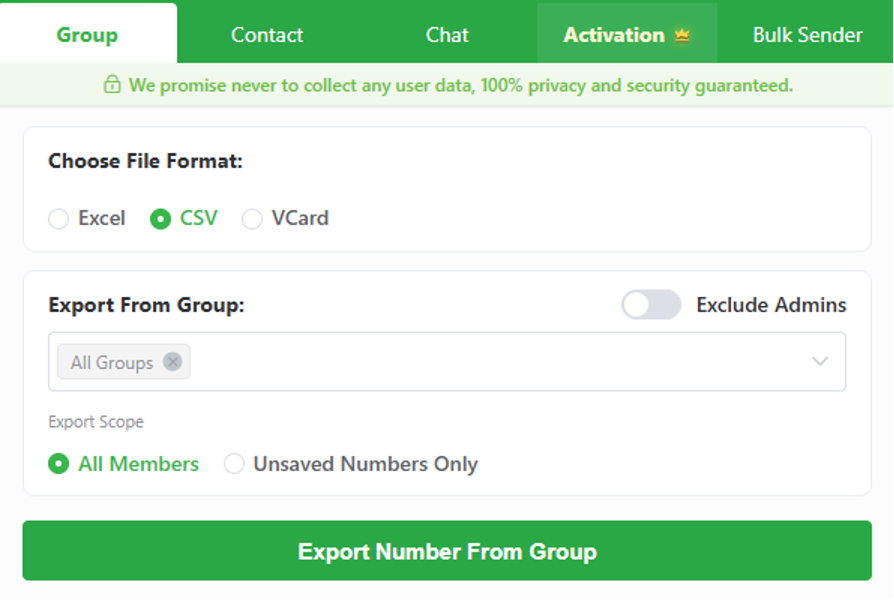
A WhatsApp group contacts extractor such as WAExport can extract group numbers and contact data for export to Excel or CSV.
Select only the groups relevant to the database. If several groups are included, preserve each group name as a source field so that contacts do not lose their original context.
After downloading, keep one unchanged copy of the export. Create a separate working copy for cleaning and classification.
Choose Between Excel and CSV
Excel is suitable when the team wants to review and edit contacts manually. Filters, highlights, additional columns, and validation rules can help identify missing or inconsistent information.
CSV is better when the data will be imported into a CRM, database, or another compatible platform. It is widely supported, but it may require exact column names and formatting.
Check the destination system’s import requirements before choosing the final format.
Review the Export Before Editing
Open the file and verify that:
- the expected contacts are present;
- numbers appear in the correct column;
- names remain connected to the correct numbers;
- country codes have been preserved;
- special characters display properly;
- source groups are identifiable;
- unrelated contacts are not included.
Do not delete the original group information until the export has been checked.
Clean and Organise the Contact Data
Raw data should not be treated as a finished contact database.
Remove Duplicate Phone Numbers
Start with exact duplicates, then look for numbers that differ only in formatting. Spaces, brackets, dashes, and country prefixes can make one number appear as several records.
If a person appears in multiple relevant groups, keep one contact record but preserve all appropriate source labels.
Standardise International Number Formats
Choose one format for international phone numbers and use it consistently.
Store numbers as text when working in a spreadsheet. Otherwise, software may remove the plus sign, change long numbers into scientific notation, or strip leading zeros.
Do not add a country code based only on assumptions. Confirm the correct location where possible.
Preserve Group and Source Information
Source information explains how the startup encountered the contact.
Useful source labels may include a group name, event, accelerator programme, product community, supplier network, or customer-support channel.
These labels make future segmentation more accurate and help the team decide which communication is relevant.
Turn the Export into a Useful Startup Database
A clean list becomes useful when it helps the team understand relationships and responsibilities.
Classify Customers, Partners, and Suppliers
Use clear categories based on known relationships.
Examples include:
- active customer;
- customer enquiry;
- supplier;
- distribution partner;
- event participant;
- mentor or adviser;
- community member.
Avoid assigning a sales category without evidence of interest.
Add Ownership and Follow-Up Fields
Assign important contacts to a specific team member. Add a next action or follow-up date when an active conversation requires one.
This prevents several employees from contacting the same person or assuming that someone else is responsible.
Keep an Unedited Original Copy
Maintain the initial export separately from the working database.
If rows are deleted, numbers are reformatted, or classifications are changed incorrectly, the team can return to the original file for comparison.
When to Move from a Spreadsheet to a CRM
A spreadsheet is often enough at the beginning, but its limitations become clearer as the company grows.
Recognise the Limits of Manual Contact Management
A CRM may be useful when several employees update the same records, follow-ups are frequently missed, duplicate data becomes difficult to control, or customer conversations span multiple channels.
The decision should be based on operational need rather than the number of contacts alone.
Prepare Fields for CRM Import
Before migration, standardise column names, phone numbers, countries, source labels, relationship types, ownership fields, and permission records.
Remove irrelevant information instead of transferring every spreadsheet column into the CRM.
Test the Migration with a Small Sample
Import a small set of contacts first. Confirm that fields map correctly, phone numbers remain unchanged, and existing records are not overwritten.
Correct any problems before moving the full database.
Use WhatsApp Contact Data Responsibly
Contact management must respect privacy and communication preferences.
Record Consent and Communication Preferences
Group membership does not automatically provide consent for marketing messages.
Record whether a person has agreed to receive direct communication, what type of communication is permitted, and how that permission was obtained.
Avoid Unsolicited Bulk Outreach
Do not turn exported group numbers into an indiscriminate messaging list. Unwanted outreach can damage the startup’s reputation, generate complaints, and lead to account restrictions.
Communication should be expected, relevant, and appropriate to the existing relationship.
Limit Access and Delete Unnecessary Data
Store the database in an approved location and give access only to employees who need it.
Remove contacts that no longer serve a legitimate purpose and delete unnecessary export copies from personal devices, download folders, and temporary storage.
Create a Contact System That Can Grow with the Startup
A reliable contact database does not need to be complicated. It needs consistent fields, clear sources, defined ownership, and accurate communication permissions. By exporting relevant WhatsApp group contacts, cleaning the data, preserving context, and preparing it for future CRM use, a startup can build a more organised system without collecting information it does not need

0 Comments