

Text-to-3D and image to 3D tools like Meshy compress concept exploration from hours to under 90 seconds per idea. The market is growing at 30%+ annually across games, product design, and e-commerce. These tools are useful. They also fail in patterned, repeatable ways that cost real credits. Learn the failure modes before you discover them yourself.
What Problem Are These Tools Actually Solving?
Most teams explore three or four design directions before committing. Not because they only have three ideas. Because modeling every concept costs an hour each.
Text-to-3D changes that math. The 3DALL-E project, presented at ACM’s Designing Interactive Systems conference in 2023, found that integrating AI into 3D workflows directly increases how many directions designers explore before converging. When each iteration gets cheaper, you just try more things, and trying more things tends to land on a better result.
Text-to-3D vs. Image-to-3D: Which One Should You Use?
Pick based on what you’re starting with. Picking the wrong one wastes more time than just learning the difference up front.
| Your Situation | Use This | Why |
| Written concept, no visual reference | Text-to-3D | Test multiple directions before you sketch anything |
| A sketch, photo, or product shot exists | Image-to-3D | Anchors proportions to reality, not the model’s word interpretation |
| Need accurate backs and undersides | Multi-view image-to-3D (2–4 angles) | Single-image generation guesses unseen geometry; multiple angles don’t |
| Hair, fur, fabric, or no real-world analog | Text-to-3D | Photo reconstruction fails these surfaces; a detailed prompt sidesteps it |
Why Does Text-to-3D Keep Generating Extra Limbs?
Most of the failure modes trace back to a handful of root causes, and once you know which one you’re hitting, the fix is usually a one-line prompt edit.
Meshy AI’s Meshy 6 model runs in two stages: a shape pass, then a texture pass. Output is stochastic, which means the same prompt produces different results each run. That’s not a bug you can file. It’s how the model works.
What actually breaks, and why:
- Extra limbs or doubled heads: The model is pattern-matching. “Warriors” statistically has more than one. Use one clear subject: “a warrior.”
- Floating accessories: The prompt described an object, but not how it attaches. Write “helmet on head” instead of just “helme”—that distinction matters more than it sounds like it should.
- Smeared face detail: Generic prompts under-specify facial geometry. Run AI texturing afterward with a face-specific prompt, or switch to image-to-3D with a clear reference photo.
- Inconsistent results between runs: By design. Generate three or four times per concept and pick the strongest.
Treat text-to-3D like rolling for variations. Not a button that produces a guaranteed output.
What Makes a Good Image-to-3D Input?
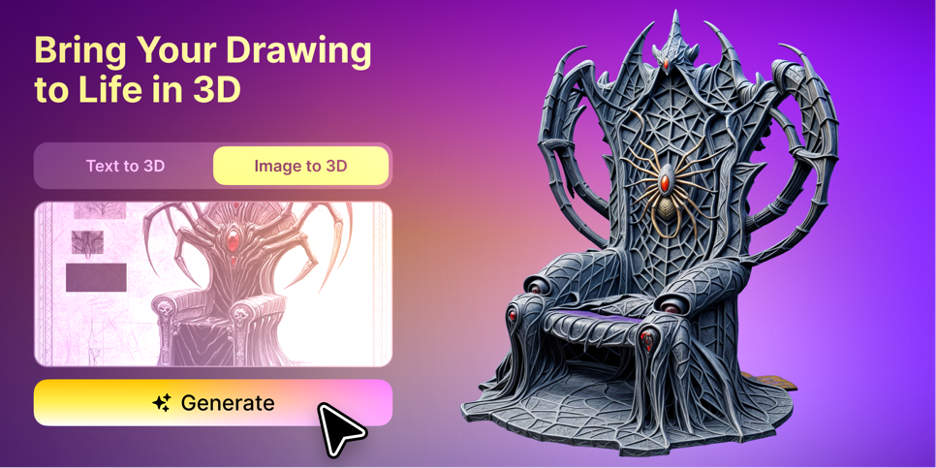
Bad inputs produce bad outputs. The model cannot fix what you hand it.
The minimum resolution is 1024×1024 px. Planning to refine afterward? Shoot for 2048px. Background matters: solid white, neutral gray, or transparent. Busy backgrounds blend into the subject and degrade the mesh. I’ve seen a clean character model turn into visual noise because the background shared its color family.
For multi-view inputs, keep everything consistent: same lighting, color treatment, and scale across all angles. Mixing a colored render with a pencil sketch confuses the fusion step badly.
What goes wrong:
- Wrong materials in output: Source image has an artistic finish different from the intended material. Add explicit descriptors to the texture prompt.
- Floating disconnected pieces: Fragmented or busy input. One coherent subject per image.
- Symmetry errors: Asymmetric photo, symmetric result expected. Add “symmetrical” to the texture prompt and use a symmetric reference.
Chrome, glass, hair, and fur all reconstruct poorly from photos. For those, switch to text-to-3D with a detailed material prompt.
How Do You Turn an AI Draft Into Something You Can Actually Use?
Most platforms export to GLB and GLTF (web and AR), FBX (Unity and Unreal), STL and 3MF (slicers like Cura and Bambu Studio), and USDZ (Apple AR). Meshy has native plugins for Blender, Unity, Unreal, Maya, and Godot, so you skip the manual import-and-fix loop entirely.
Meshy AI published a self-reported benchmark claiming a 97% slicer pass rate on complex figurine geometry. Vendor data, not an independent audit. Run your own test print before committing to production. As of April 2026, Meshy’s integration with Formlabs’ Form Now service also lets you place a print order directly from within the platform.
What Are These Tools Genuinely Bad At?
Most comparison articles skip this part.
They are not CAD. There’s no constraint solver and no enforcement of engineering tolerances. For mechanical parts with fit-and-function requirements, AI 3D generation gives you a shape reference for a CAD pass. That’s it.
Output is stochastic. Budget credits for multiple attempts. One generation per concept is not enough for anything that matters.
Production assets still need cleanup. AI meshes come out dense and irregular. For animation, rigging, or game engine imports at scale, you’ll still run a retopology pass. Built-in remesh tools help; they don’t replace an artist’s eye on hero assets.
Licensing differs by plan. Meshy’s free tier outputs are CC BY 4.0: commercially usable, but attribution is required, and assets are shared publicly. Easy detail to miss until a client asks who owns the model.
How Does Meshy Compare to Tripo, Rodin, and the Others?
| Platform | Strongest At | Honest Tradeoff |
| Meshy AI | Speed, auto-rigging, AI texturing, widest export coverage (Blender, Unity, Unreal, Maya, Godot, API) | One model family; no A/B testing engines inside the platform |
| Tripo AI | Clean quad topology and fast auto-rigging for game characters | Slower in high-fidelity modes; free-tier credits run tight under daily use |
| Rodin (Hyper3D) | Photorealistic output, 4K PBR textures, T/A-pose enforcement for rigging | Premium pricing; not built for product or mechanical work |
| Hunyuan3D (Tencent) | Strong geometry quality and zero licensing cost for self-hosting | Technical setup required; community license has regional restrictions |
What Does Meshy Actually Cost Per Asset?
The number that matters is cost per finished asset, not the subscription price. A full Meshy 6 generation (both stages) costs 20 credits.
| Plan | Price | Monthly Credits | Full Generations | Best For |
| Free | $0 | ~100-200 | 5-10 | Testing before committing |
| Pro | ~$20/mo | 1,000 | ~50 | Solo creators need private ownership |
| Studio/Max | ~$60/mo | Higher tier | More, faster queues | Small teams with shared billing |
| Enterprise | Custom | Custom | Custom | Studios integrating into a larger pipeline |
Credit allocations change with promotions. Confirm current numbers on Meshy’s pricing page before budgeting a project.
A Practical Workflow That Actually Works
- Generate wide, not deep. Write four or five distinct prompts rather than perfecting one. The tenth idea costs the same as the first.
- Check geometry before paying for texture. Inspect the untextured mesh first. Wrong silhouette? Swap the prompt before you pay for the texture pass.
- Switch to image-to-3D once you’ve converged. Sketch your strongest direction, then run multi-view image-to-3D for better proportional accuracy.
- Export for what happens next. GLB for stakeholder review, FBX for engine work, STL or 3MF for a print check, USDZ for iPhone AR.
Key Takeaways
- Generate three or four variations per concept. Stochastic output means that one attempt rarely gives you the best result.
- Free-tier Meshy outputs require attribution and public sharing. If you’re working commercially, that’s a paid-plan decision now, not later.
Conclusion
The teams getting real value from text-to-3D aren’t using it to skip 3D artistry. They’re using it to kill weak ideas cheaply before an artist touches anything. Know the failure modes, plan a cleanup pass for anything that ships, and treat the tool as a filter, not a finish line. Expect a finished production asset from one click, and you’ll spend a lot of credits finding out they’re not that.
FAQs
Is an AI-generated model ready to 3D print without changes?
Simple geometry often passes a slicer directly. Complex or thin-walled designs frequently have non-manifold surfaces or disconnected parts. Always run a test print in PrusaSlicer or Bambu Studio before committing to production.
Can I sell AI-generated 3D models commercially?
On Meshy’s free tier, CC BY 4.0 applies: commercial use is allowed, but attribution is required, and assets are shared publicly. Paid plans grant full private ownership.
How is image-to-3D different from photogrammetry?
Photogrammetry needs dozens of overlapping photos from a controlled capture sequence. Image-to-3D AI reconstructs a plausible mesh from as few as one photo. Faster, less rigorous, built for concept work rather than scientific accuracy.
How long does a generation actually take?
Standard text-to-3D and image-to-3D on Meshy finish in 30-90 seconds. Multi-view and higher-fidelity modes add a few seconds to several minutes.
Does text-to-3D replace a 3D artist?
No. It replaces the slow part of going from a blank canvas to something worth reacting to. Hero assets, complex rigs, and anything requiring engineering tolerances still need a skilled artist’s pass.

0 Comments